
Download Yellow Cal – Calendar, Reminders, Social Calendar, Live Chat
Overview
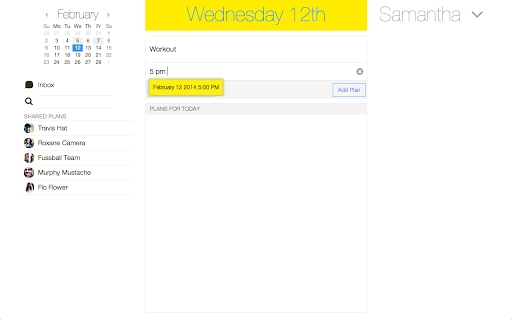
Yellow Cal is a desktop application designed to simplify personal and collaborative scheduling for everyday events. The software serves as a lightweight calendar and reminder tool, ideal for users who need to track routine tasks such as package deliveries, report due dates, and family visits. Its primary purpose is to help individuals and small groups stay organized through a clean, intuitive interface that supports both individual use and shared planning.
Target users include students, remote workers, and small teams seeking an easy way to coordinate simple schedules without the complexity of enterprise-level tools. The application integrates live-chat functionality, allowing direct communication with friends or colleagues, even across different platforms like iPhone and Android. This makes it particularly useful for informal group planning, such as organizing social events or managing shared household tasks.
Yellow Cal leverages cloud sync powered by Adylitica Cloud Sync, enabling real-time updates across devices. Data is stored locally in the Chrome browser and automatically syncs when connectivity is restored, ensuring reliability even in offline scenarios. Users can also connect Google Contacts or Facebook Contacts to streamline friend discovery and collaboration. The developer, Adylitica, has previously released tools like Do it (Tomorrow), Everyday Notes, and Memo Notepad, suggesting a focus on lightweight, productivity-oriented apps.
Key Features & Capabilities
- Simple Agenda Interface: Provides a clean, minimal calendar layout focused on everyday events, reducing visual clutter and making scheduling intuitive.
- Real-Time Reminders: Sends timely alerts for upcoming tasks such as deliveries or deadlines, helping users avoid missed appointments.
- Integrated Live Chat: Enables direct messaging between users within the app, supporting collaboration regardless of the recipient’s device (iPhone, Android, or desktop).
- Multi-Platform Sync: Synchronizes data instantly across Windows, Mac, Chrome OS, iPhone, and Android, ensuring consistent access to schedules and messages.
- Offline Functionality: Allows full use of the app without an internet connection; changes are saved locally and synced once online.
- Contact Integration: Supports linking with Google Contacts and Facebook Contacts to simplify adding friends and initiating shared planning sessions.
- Single Sign-On via Existing Accounts: Users with accounts from Do it (Tomorrow), Everyday Notes, or Memo Notepad can sign in without creating a new profile.
These features are especially beneficial for users managing personal routines or coordinating small group activities. For example, a student can set a reminder for a textbook delivery, chat with a study partner about the timing, and sync the plan across all devices. Similarly, a family can use Yellow Cal to track visiting relatives and update plans in real time, even if one member is using a mobile device.
User Interface, Workflow & Performance
The user interface of Yellow Cal emphasizes simplicity and accessibility. The layout is structured around a central calendar view with clear date markers and event entries, minimizing cognitive load. Navigation is straightforward, with intuitive controls for adding, editing, and viewing events. The inclusion of live chat within the same window reduces context switching, enhancing workflow efficiency.
Users can expect a responsive experience typical of lightweight Chrome-based applications. The app operates within the Chrome browser environment, which contributes to its consistent behavior across supported platforms. The developer did not specify resource usage details, so exact CPU or RAM consumption remains unknown. However, given its 2.5 MB size and focus on basic scheduling, it is likely optimized for low overhead.
Stability appears to be maintained through the use of cloud sync and local storage mechanisms. Since data is saved in the Chrome browser and automatically reconciled upon reconnection, the risk of data loss during network interruptions is reduced. Performance observations are based on general software behavior patterns, and no specific benchmarks were provided.
Compatibility & System Requirements
Yellow Cal is compatible with Windows, Mac, and Chrome OS, making it accessible to a broad range of desktop users. The software is distributed as a Chrome App, meaning it runs within the Google Chrome browser environment. This dependency ensures consistent performance across supported systems, though it limits functionality to devices where Chrome is available.
The installation size is 2.5 MB, indicating a minimal footprint. The developer did not specify additional hardware requirements such as RAM or processor specifications. Exact system requirements were not listed, so users should ensure their system supports the latest version of Google Chrome to run the application properly.
Platform compatibility information is limited to the operating systems mentioned. While the app supports iPhone and Android through dedicated mobile versions, the desktop version is designed for desktop environments. No information was provided about support for older OS versions or alternative browsers.
Pros and Cons
Pros
- Lightweight design with a minimal 2.5 MB size
- Seamless cross-platform synchronization between desktop and mobile devices
- Integrated live chat for real-time collaboration
- Supports offline use with automatic sync upon reconnection
- Easy integration with Google and Facebook Contacts
- Single sign-on available for existing Adylitica users
Cons
- Requires Google Chrome to run, limiting use on non-Chrome environments
- Exact system requirements not specified
- No information on advanced customization options
- Dependent on third-party cloud services for data sync
- Limited to basic calendar and reminder functions without advanced features
FAQ Section
Is Yellow Cal available for Windows and Mac?
Yes, Yellow Cal is compatible with both Windows and Mac operating systems. It runs as a Chrome App, so users must have Google Chrome installed to use it.
Can I use Yellow Cal without an internet connection?
Yes, the app supports offline usage. Events and messages are saved locally in the Chrome browser and will sync automatically when an internet connection is restored.
Is Yellow Cal safe to use?
Yellow Cal uses Adylitica Cloud Sync to manage data, and all user information is stored securely within the Chrome browser. The app does not collect personal data beyond what is necessary for functionality.
How do I update Yellow Cal?
Updates are automatically managed through the Google Chrome Web Store. When a new version is available, it will be downloaded and installed silently in the background.
Can I use my existing Do it (Tomorrow) or Everyday Notes account to sign in?
Yes, users who already have an account with Do it (Tomorrow), Everyday Notes, or Memo Notepad can sign in to Yellow Cal using the same credentials, eliminating the need to create a new account.
Final Thoughts + CTA
Yellow Cal delivers a focused, user-friendly solution for managing everyday schedules and coordinating with others. Its blend of calendar functionality, live chat, and cross-platform sync makes it a strong choice for individuals and small groups seeking a simple yet effective productivity tool. The offline support and contact integration further enhance its usability in real-world scenarios.
While it lacks advanced features found in full-featured calendar suites, its simplicity is its greatest strength. Users who value ease of use, instant access, and seamless collaboration across devices will find Yellow Cal to be a reliable companion. With no cost to download and a straightforward setup process, it offers excellent value.
Download Yellow Cal now







